
Skip to content
Build better, together
Uploading Multiple Files to a Microsoft SharePoint Site

Uploading Multiple Files to a Microsoft SharePoint Site

Uploading Multiple Files to a Microsoft SharePoint Site

What is the easiest way to upload multiple files to a Microsoft SharePoint site?

If you are using SharePoint 2013 and Internet Explorer 10, then you can actually click and drag files to the folder.

Here are the steps to follow:

  1. Open the SharePoint site.
  2. Open the appropriate Folder.
  3. Open Internet Explorer on your desktop.
  4. Select the appropriate files.
  5. Click and drag to the area above the files as seen below:
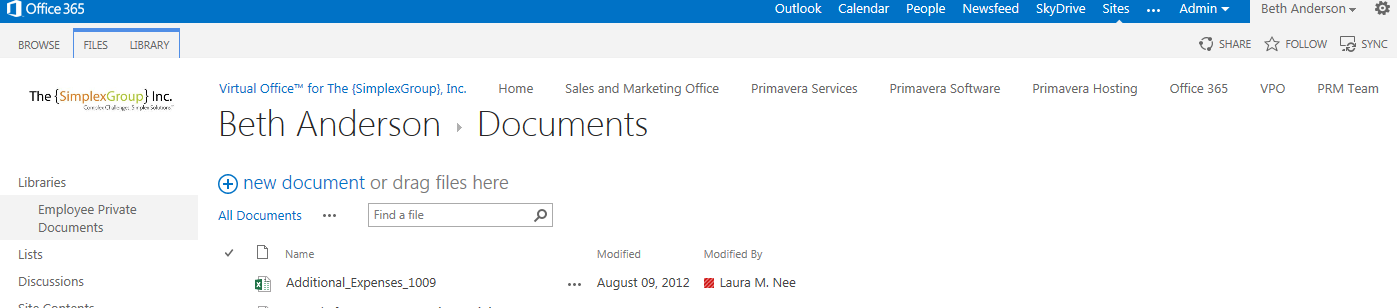
BA blog Aug 2013

If you do not see the "drag files here," then you are either not using SharePoint 2013, or you are not using Internet Explorer 10. If you are in an older version of SharePoint, then click on Documents and an arrow next to Upload Documents. If you click on that arrow, then you should have the option for Upload Multiple Documents, as shown below:


BA blog Aug 2013 2


About VPO

VPO is a cloud-based collaboration platform built just for construction project teams. Easily configurable and user-friendly, VPO is designed to enhance efficiency and productivity while minimizing risk. We partner with each customer to meet their team's unique project management needs. VPO is a certified Woman-owned Business Enterprise (WBE), and we've been improving construction project management through tech since 1984. In a world of start-ups, we're a stay-up.

VPO™

See VPO’s Versatility in Action

Watch a three-minute demo of our construction management software to witness what VPO can do for you.

VPO-inset-laptop-features-min