Skip to content
Build better, together
Scheduling a Meeting with Lync in Microsoft Office 365

Scheduling a Meeting with Lync in Microsoft Office 365

Scheduling a Meeting with Lync in Microsoft Office 365

In Lync, I thought I could schedule a Web meeting, but I am only seeing 'Meet Now.' Am I missing something?

No, that is correct. While in Lync you can start a meeting (Meet Now) and invite people to the meeting. To schedule a meeting for a future date/time, you need to be in Outlook and do the following:

  • Open the Calendars portion of Outlook
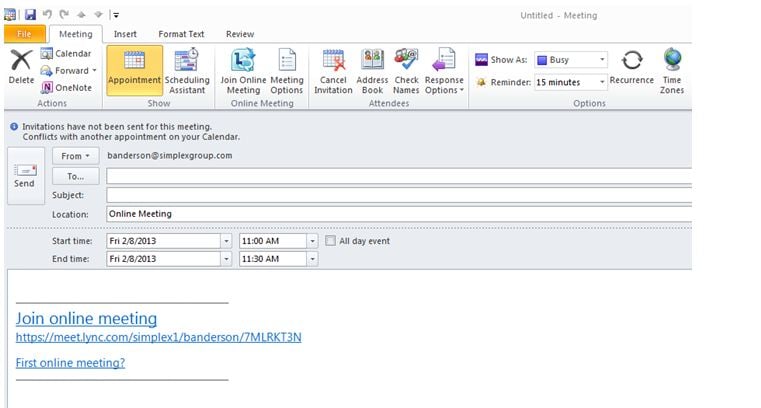
  • From the Ribbon click on the New Online Meeting Icon new online meeting

    This will open a Meeting Email message where you can enter the people whom you would like to invite to the meeting. Then enter the start and end date and time of the meeting, as well as a subject for the meeting.  When finished, click the Send button.
send

The attendees will receive an e-mail message, and once they accept the invitation, the meeting will be added to their calendar. To attend the meeting, they will open the meeting and click the Join online meeting link.

zp8497586rq

About VPO

VPO is a cloud-based collaboration platform built just for construction project teams. Easily configurable and user-friendly, VPO is designed to enhance efficiency and productivity while minimizing risk. We partner with each customer to meet their team's unique project management needs. VPO is a certified Woman-owned Business Enterprise (WBE), and we've been improving construction project management through tech since 1984. In a world of start-ups, we're a stay-up.

VPO™

See VPO’s Versatility in Action

Watch a three-minute demo of our construction management software to witness what VPO can do for you.

VPO-inset-laptop-features-min